Malware Samples - PMA Chapter 5
21 Dec 2025
Chapter 4 was A Crash Course in x86 Disassembly and had no labs. One thing that CS 6747 covered heavily was x86 Assembly, so I was very comfortable with this topic. Still, I like to read different perspectives on something I'm interested in learning because it reinforces anything that may have been missed and may introduce some new information, which was the case here. In this chapter, I learned about instructions I had not heard of like ROR/ROL, REP, and IN. It also dove into details about MUL and DIV I was not aware of. Chapter 4 would be an excellent introduction to Assembly for anyone new to the subject, except that I still like to think of the stack as growing downward (it's just easier to visualize how everything fits together that way).
Chapter 5 is just an introduction to IDA Pro and all of the questions are based on one DLL. Even though I'm already familiar with this type of static analysis, all of my experience so far has been with Ghidra and this will help to make me a more well-rounded malware analyst. Unfortunately Hex-Rays does not have an archive of previous IDA Pro versions and the newest version was not compatible with Windows XP. This forced me to install a Windows 10 VM, which is some added work for the labs in this book, but will be useful for any malware analysis I want to do in the future.
Questions:
- What is the address of DllMain?
- Use the Imports window to browse to gethostbyname. Where is the import located?
- How many functions call gethostbyname?
- Focusing on the call to gethostbyname located at 0x10001757, can you figure out which DNS request will be made?
- How many local variables has IDA Pro recognized for the subroutine at 0x10001656?
- How many parameters has IDA Pro recognized for the subroutine at 0x10001656?
- Use the Strings window to locate the string \cmd.exe /c in the disassembly. Where is it located?
- What is happening in the area of code that references \cmd.exe /c?
- In the same area, at 0x100101C8, it looks like dword_1008E5C4 is a global variable that helps decide which path to take. How does the malware set dword_1008E5C4?
- A few hundred lines into the subroutine at 0x1000FF58, a series of comparisons use memcmp to compare strings. What happens if the string comparison to robotwork is successful?
- What does the export PSLIST do?
- Use the graph mode to graph to cross-references from sub_10004E79. Which API functions could be called by entering this function? Based on the API functions alone, what could you rename this function?
- How many Windows API functions does DllMain call directly? How many at a depth of 2?
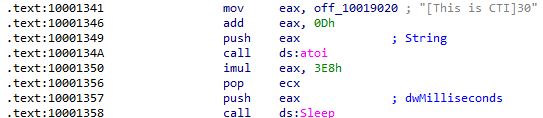
- At 0x10001358, there is a call to Sleep. Looking backward through the code, how long will the program sleep if this code executes?
- At 0x10001701 is a call to socket. What are the three parameters?
- Using the MSDN page for socket and the named symbolic constants functionality in IDA Pro, can you make the parameters more meaningful? What are the parameters after you apply changes?
- Search for usage of the in instruction (opcode 0xED). This instruction is used with a magic string VMXh to perform VMware detection. Is that in use in this malware? Using the cross-references to the function that executes the in instruction, is there further evidence of VMware detection?
- Jump your cursor to 0x1001D988. What do you find?
- If you have the IDA Python plug-in installed, run Lab05-01.py, an IDA Pro Python script provided with the malware for this book. What happens after you run the script? (Make sure the cursor is at 0x1001D988)
- With the cursor in the same location, how do you turn this data into a single ASCII string?
- Open the script with a text editor. How does it work?
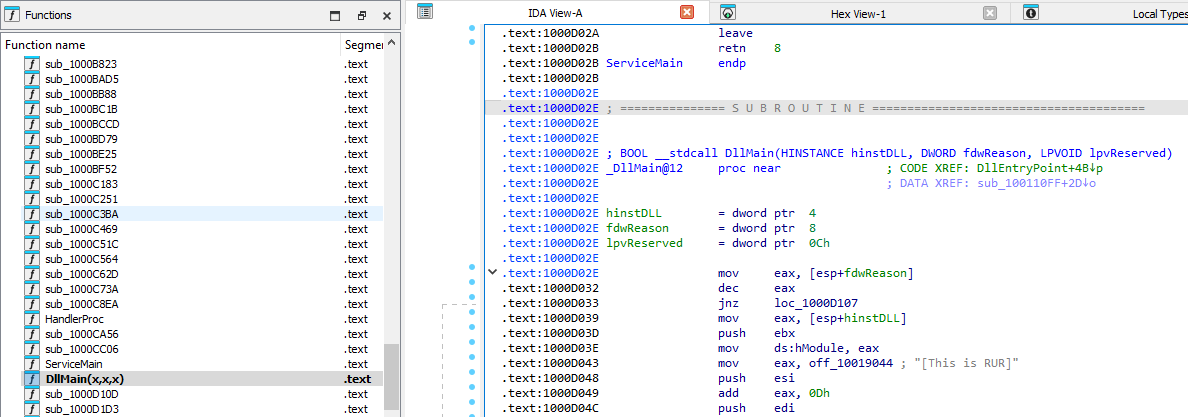
What is the address of DllMain?
DllMain can be located by looking through the Functions window on the left side of the display. Double-clicking brings us to that function, which is located at 0x1000D02E:
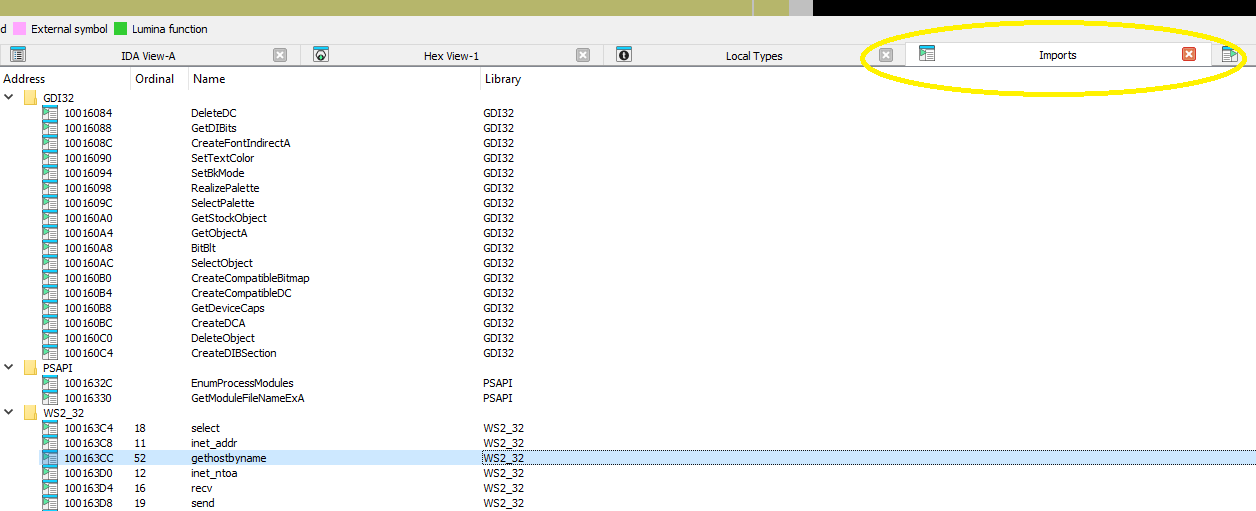
Use the Imports window to browse to gethostbyname. Where is the import located?
Clicking on the Imports tab and scrolling down to gethostbyname shows that function at 0x100163CC:
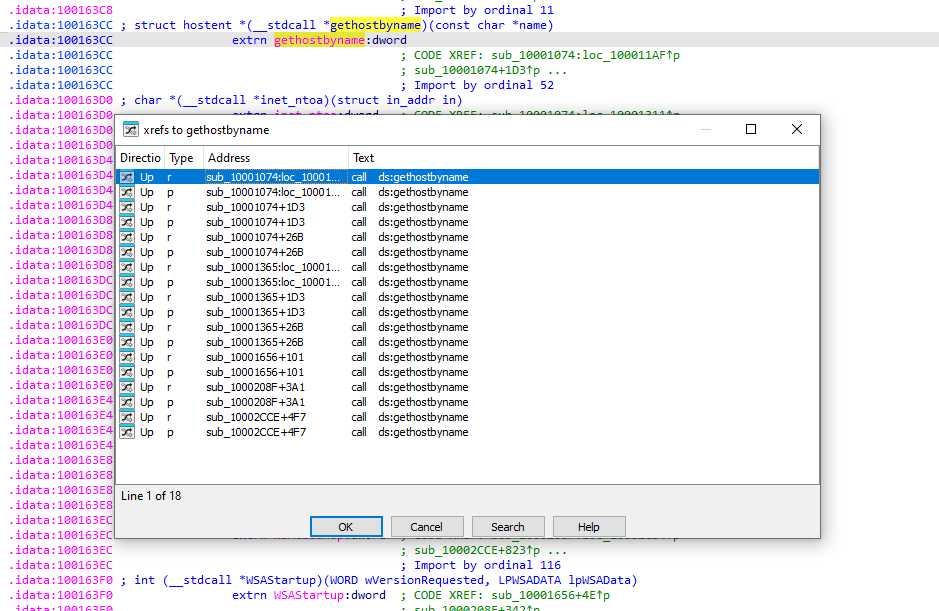
How many functions call gethostbyname?
Double-clicking on the function in the imports window jumps to 0x100163CC in the .idata section. Clicking on function name and then pressing X brings up the cross-references window. Each call is counted twice (in the Type column p is a "near", or intrasegment, call and r is a reference), so the list of 18 items is actually 9 calls. The Address column shows the address of each function where gethostbyname was called and the offset of the call from the start of that function. The Address column shows 5 different functions (note that functions sub_1001074 and sub_1001365 have multiple offsets):
Focusing on the call to gethostbyname located at 0x10001757, can you figure out which DNS request will be made?
The previous jump to that function showed that it takes one argument. The last thing pushed to the stack before the call was made at 0x10001757 was the data stored at 0x10019040, which was pics.practicalmalwareanalysis.com:

How many local variables has IDA Pro recognized for the subroutine at 0x10001656?
Local variables are stored at a negative offset from EBP. Jumping to that address shows 23 items matching that definition:
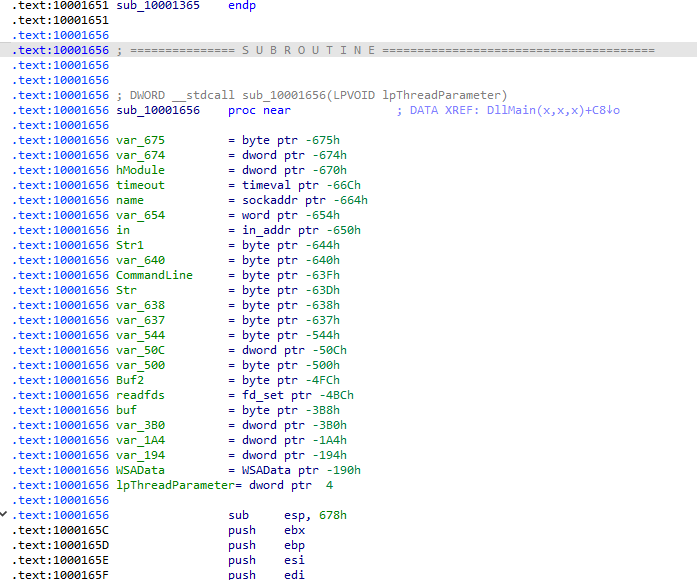
How many parameters has IDA Pro recognized for the subroutine at 0x10001656?
Only one variable from the previous step is located above EBP, which means that lpThreadParameter the only argument to this function.
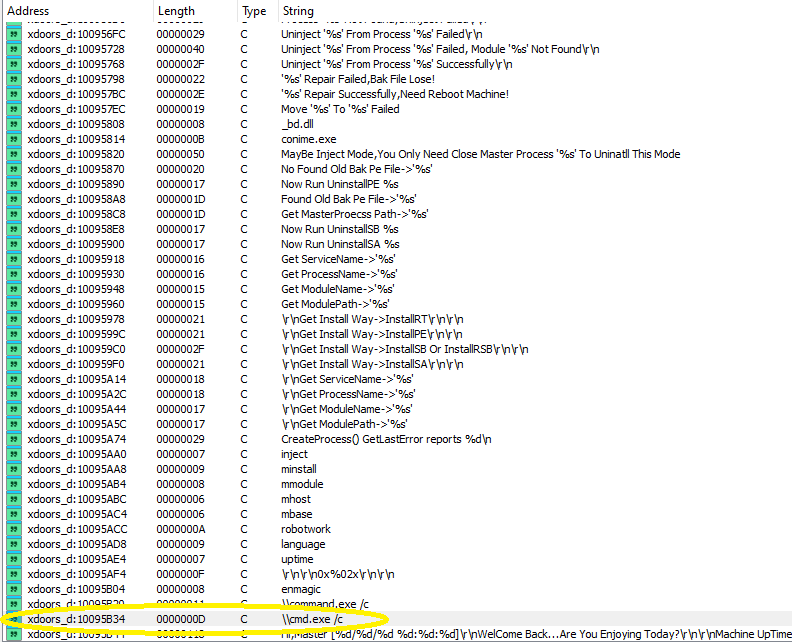
Use the Strings window to locate the string \cmd.exe /c in the disassembly. Where is it located?
This string is located at 0x10095B34 in a section called xdoors_d, which contains many other strings indicating that this is a backdoor:
What is happening in the area of code that references \cmd.exe /c?
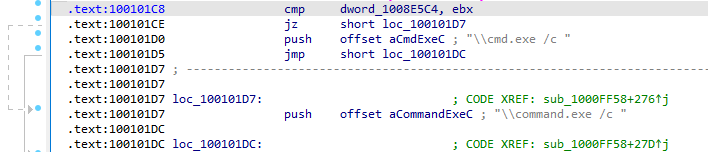
This string is referenced at 0x100101D0, in the .text section. After being pushed to the stack, it is appended to a local variable on the stack IDA has named Destination using strcat:
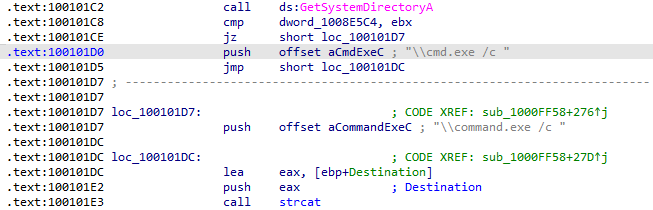
The string is used to create a new instance of cmd.exe and scrolling back through this function, it appears that this instance is created for usage through the backdoor:

In the same area, at 0x100101C8, it looks like dword_1008E5C4 is a global variable that helps decide which path to take. How does the malware set dword_1008E5C4?
Checking cross-references, there is only one location where dword_1008E5C4 is defined:
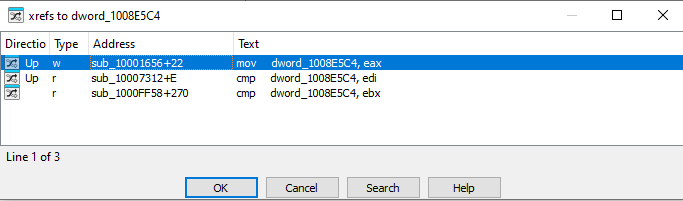
At that location, a user-defined function is called and the return value from that function is placed into dword_1008E5C4:

The purpose of that function is the retrieval of OS version information:
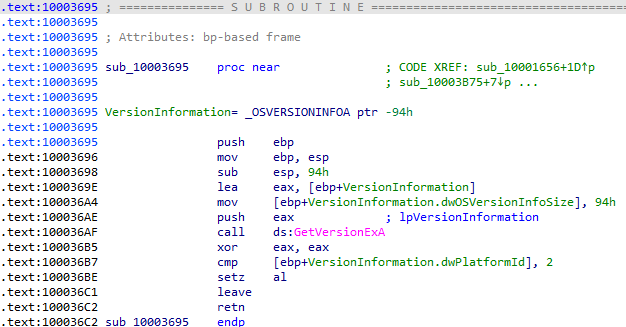
The value written to EAX (AL) at the end of that function, which is then used in the comparison referenced in the question, is the result of a comparison of VersionInformation.dwPlatformId with 2, which according to Microsoft's documentation indicates that it is a 32-bit Windows system:

Going back to the original question, the result returned from VersionInformation.dwPlatformId dictates whether the string cmd.exe or command.exe will be used:
A few hundred lines into the subroutine at 0x1000FF58, a series of comparisons use memcmp to compare strings. What happens if the string comparison to robotwork is successful?
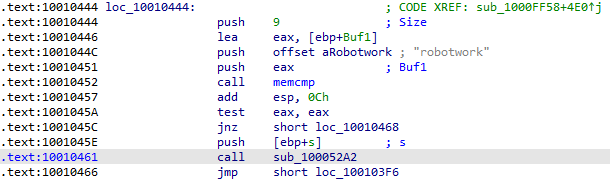
The string comparison is performed using memcmp, which will return 0 if the strings are identical, meaning if this comparison is successful, the following jump will not be taken and a user-defined function will be called:
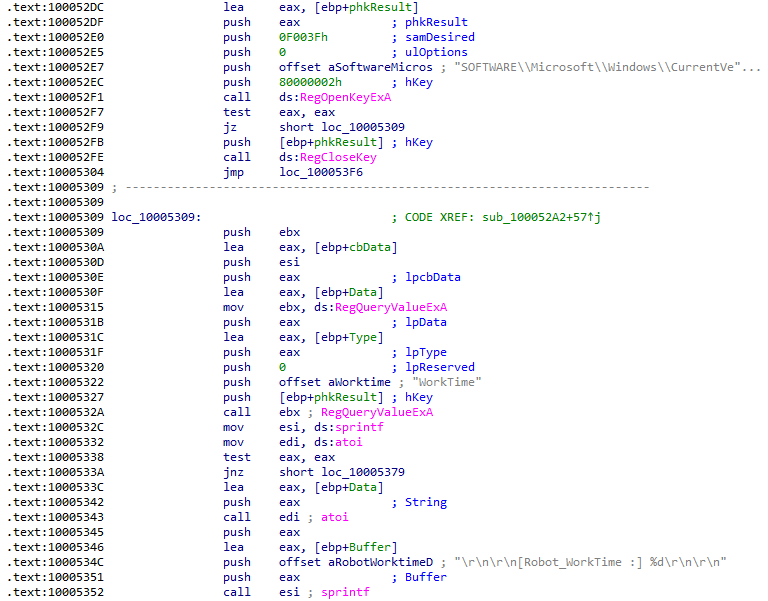
The purpose of this function is the retrieval of a Robot_WorkTime value from the registry, which I am assuming is the total uptime of this backdoor or some similar measurement:
What does the export PSLIST do?
Double-clicking on PSLIST from the Exports window jumps straight to this function, which takes 3 ints and a string as arguments:
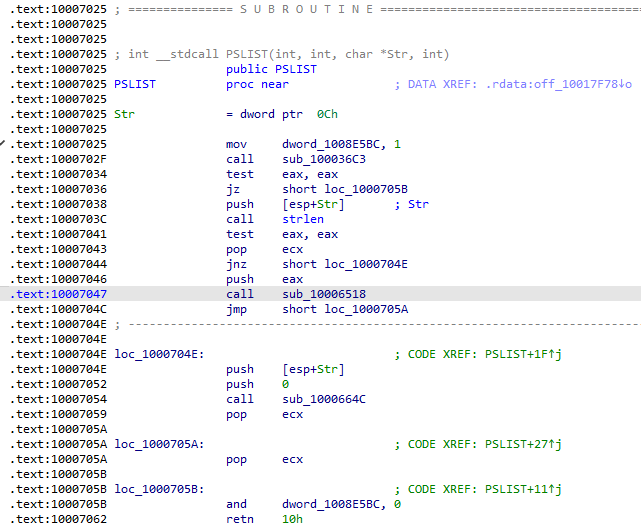
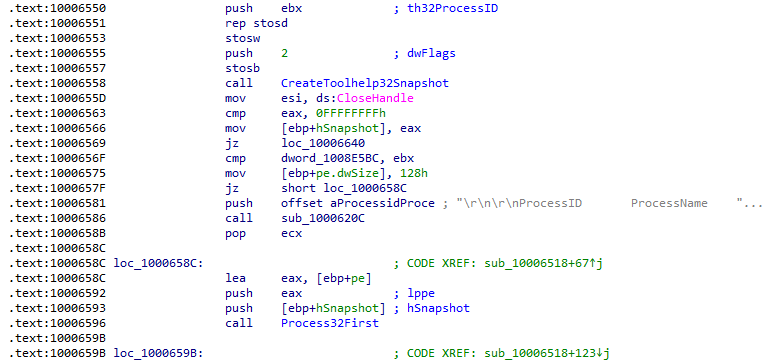
strlen is performed on the string argument and if successful, calls a user-defined function which returns process IDs and names depending on the arguments supplied:
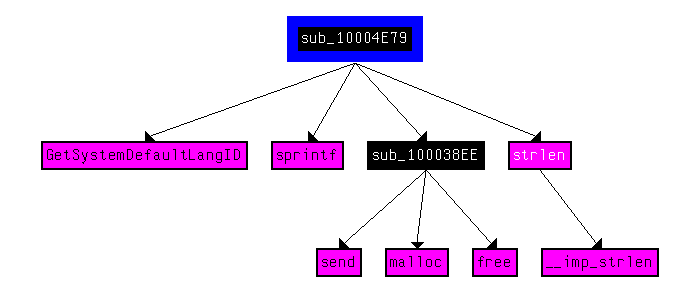
Use the graph mode to graph to cross-references from sub_10004E79. Which API functions could be called by entering this function? Based on the API functions alone, what could you rename this function?
Based on the calls to GetSystemDefaultLangID and send, it appears to send the default language of the system back to the C2. This sounds a lot like actual functionality implemented by ransomware groups like REvil who check if the user is from a Russian-speaking country before performing any malicious activity. A good name for this function would be checkIfRussian:
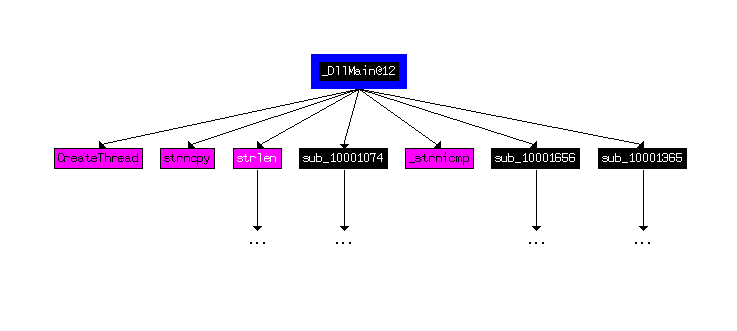
How many Windows API functions does DllMain call directly? How many at a depth of 2?
Viewing a custom graph of cross-references from DllMain shows only 4 Windows API calls at a recursion depth of 1:
Increasing the depth to 2 adds a signifcant number of calls; I counted 33:

At 0x10001358, there is a call to Sleep. Looking backward through the code, how long will the program sleep if this code executes?
First, the string "30" is converted to an integer and then multipled by 0x3E8, which is 1000 in decimal, before calling Sleep on that value. This would result in a sleep time of 30,000 ms (30 seconds):
At 0x10001701 is a call to socket. What are the three parameters?
The three parameters pushed to the stack prior to this call are 2, 1, and 6:

Using the MSDN page for socket and the named symbolic constants functionality in IDA Pro, can you make the parameters more meaningful? What are the parameters after you apply changes?
IDA did a good job of identifying the parameters for this call:
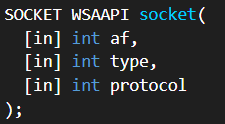
The 2 passed to the af parameter indicates IPv4:

The 1 passed to the type parameter makes this a TCP socket:

The 6 passed to the protocol parameter sets the protocol to TCP as well:

Search for usage of the in instruction (opcode 0xED). This instruction is used with a magic string VMXh to perform VMware detection. Is that in use in this malware? Using the cross-references to the function that executes the in instruction, is there further evidence of VMware detection?
Searching for "in" only returns one location where this is used as an instruction:
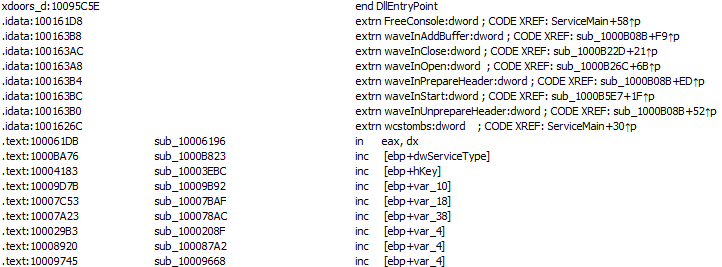
This is the series of instructions found at that location:
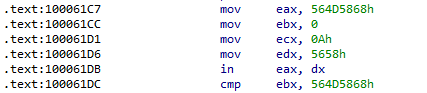
I did not feel that the book explained this instruction adequately and had to do some research to gain a better understanding. Normally, the IN instruction reads data from an I/O port into a register. In VMware, there is a virtual port VX that if read using IN while the value of EAX is VMXh, VMware will trap the instruction and return VMXh to a register and version info, etc. to other registers. This behavior does not appear to be well-documented and would be interesting to research later. Here, the VMXh and VX strings can be seen being moved into EAX and EDX:
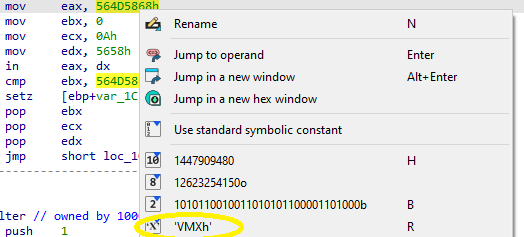
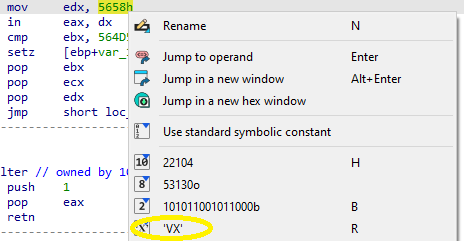
If the IN instruction detects VMware, it appears that VMXh is returned to EBX, where it is compared.
There are three references to the function containing this series of instructions, all of which contain the same string hinting at VM detection:

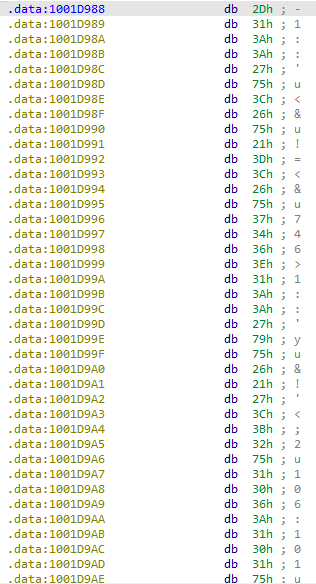
Jump your cursor to 0x1001D988. What do you find?
This points to the .data section and appears to contain an obfuscated string:
If you have the IDA Python plug-in installed, run Lab05-01.py, an IDA Pro Python script provided with the malware for this book. What happens after you run the script? (Make sure the cursor is at 0x1001D988)
Unfortunately, Hex-Rays removed Python support from free versions of IDA Pro. I had to come up with my own workaround for decoding this string.
With the cursor in the same location, how do you turn this data into a single ASCII string?
This was another difficulty I had with this string. Right-clicking and converting to string encloses each character in single quotes. This must have worked differently at the time the book was written. The most reliable way I found was going to the Hex Dump view and copying the raw bytes:

Open the script with a text editor. How does it work?
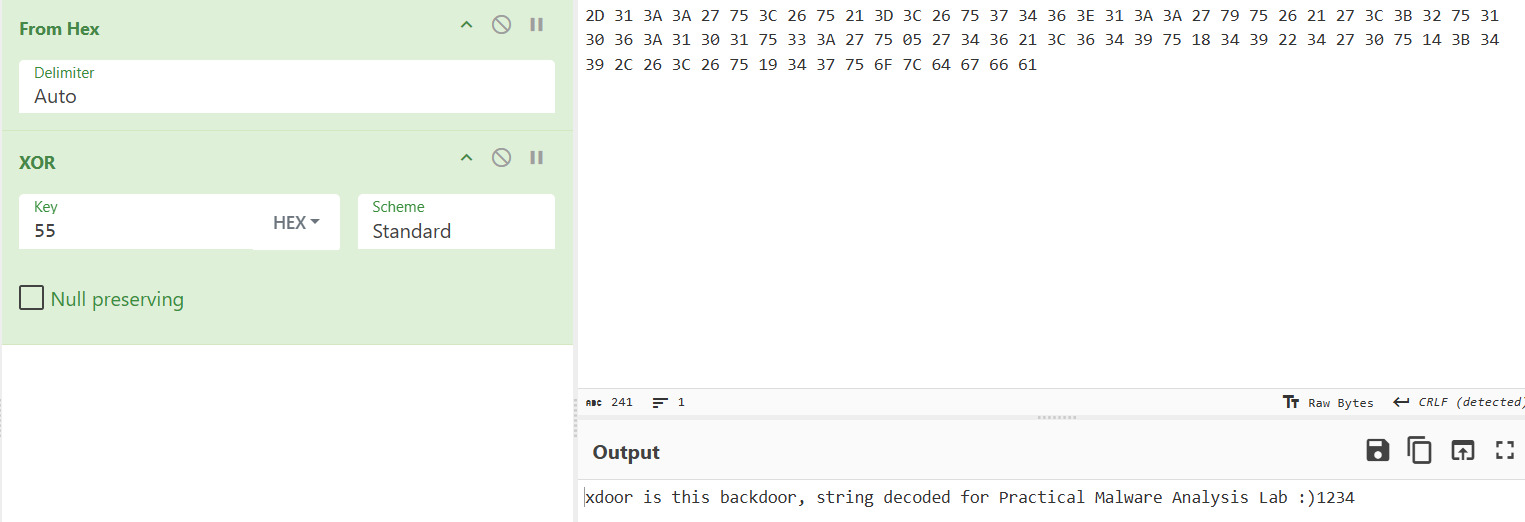
The script works by iterating over the 0x50 bytes of the obfuscated string and XORing each with 0x55:
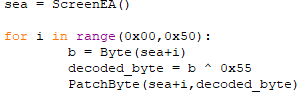
I ended up copying the raw bytes from the Hex Dump view and pasting them into Cyber Chef. Using the From Hex and XOR operations with a key of 0x55 reveals the string:
Conclusion
This was a great refresher of static analysis using a disassembler. Many of IDA's features are easier to use than Ghidra, but there are some areas where it struggles. I was disappointed that Python is no longer supported in the free versions and I look forward to the day that I am doing this type of work full time and have the opportunity to use the paid version!