
Malware Samples - PMA Chapter 9
16 Jan 2026
Chapter 8 explained some of the details about dynamic analysis using debuggers including different types of breakpoints, single-stepping instructions, stepping-over vs. stepping-into, etc. The labs in Chapter 9 provide some practice in user-mode debugging with OllyDbg.
Samples:
Malware Sample 1
This is the self-deleting sample from Chapter 3 that could not be analyzed using the basic techniques learned at that point. This sample is a backdoor that uses some interesting methods to contact the C2 server.
Questions:
- How can you get this malware to install itself?
- What are the command-line options for this program? What is the password requirement?
- How can you use OllyDbg to permanently patch this malware so that it doesn't require the special command-line password?
- What are the host-based indicators of this malware?
- What are the different actions this malware can be instructed to take via the network?
- Are there any useful network-based indicators for this malware?
How can you get this malware to install itself?
This malware is installed by passing the -in argument when running the program, which installs it as a service. If there are 3 arguments in the command (filename, -in, password), the service is created using the filename. If there is a fourth argument (filename, -in, servicename, password), that is used as the service name. The book questions for this lab are a bit out of order and how this option is arrived at will be covered in the next question.
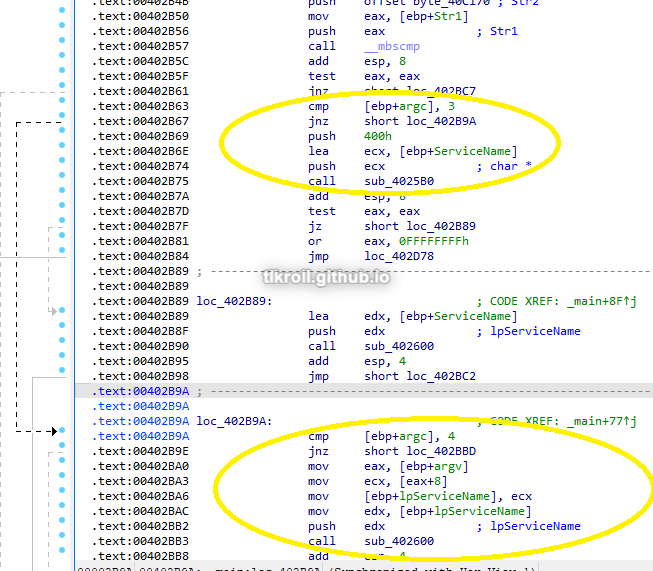
What are the command-line options for this program? What is the password requirement?
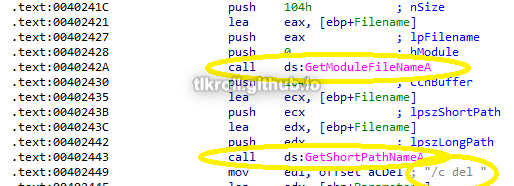
First, I looked at how to avoid the self-deletion command, which was quickly identified by looking at some of the parameters in the subroutine 0x402410 and verifying by stepping through with OllyDbg:
It looks like to avoid this function, the program needs to see at least one argument passed to it:
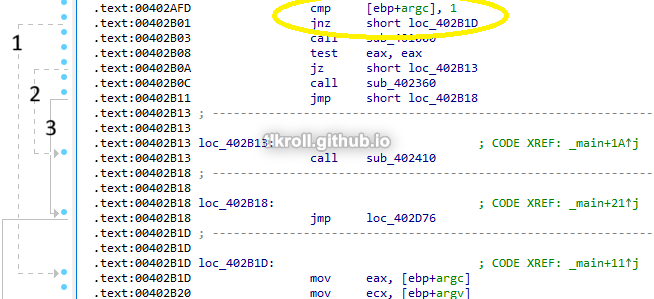
- Jumps to the code where arguments are analyzed
- Jumps to the self-deleting function
- Jumps to a JMP that ends execution
After verifying that at least one argument has been passed, the last argument is pushed to the stack and 0x402510 is called. If this call doesn't return 1 to EAX, the self-deletion function is called again:
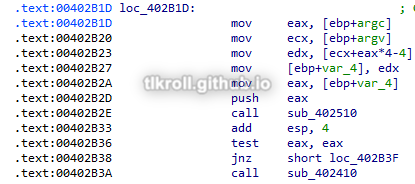
Two things can be inferred from this series of instructions: The password is passed as the final argument and the subroutine at 0x402510 verifies that it is correct.
I dove a bit deeper than required to answer this question and attempted to reverse-engineer the password-checking function. One of the cool features of OllyDbg that I haven't seen in similar programs is that you can open files with arguments:
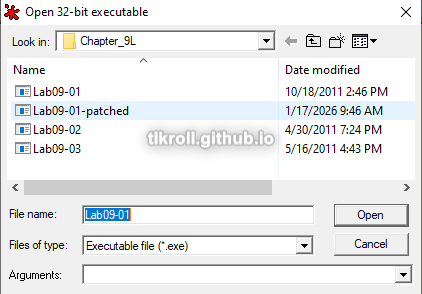
Using "testpass" as a test password, I set a breakpoint to the beginning of the function so that I could retry other passwords easily and started stepping through it. The first check that takes places is a comparison of ECX and a hard-coded value of 4:
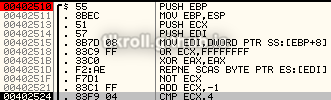
In this case, it was comparing against the value 8, so the check failed:

After testing some other passwords, it turns out that this is a length check, meaning the password is 4 characters.
Next, each character of the password is checked. The first and third are easily identified as a and c, but the second and fourth use a series of hard-to-follow calculations:
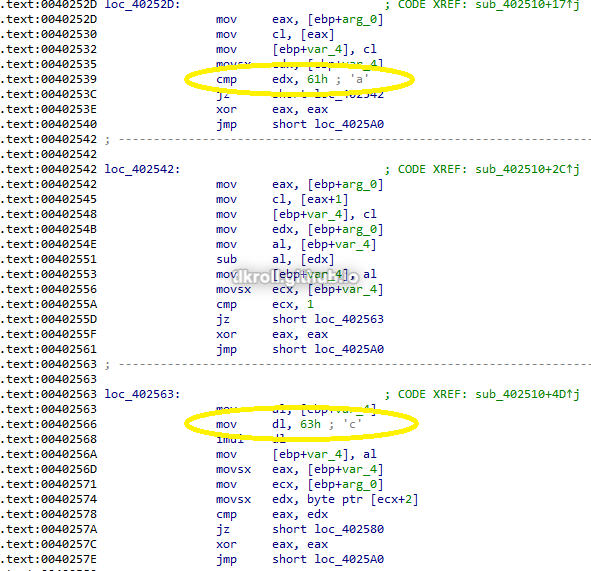
After looking at this, I tried a password of abcd and was successful! I still wanted to see how it could be figured out without a guess though. Trying different characters and looking at the results of the character-checking operations in OllyDbg quickly leads to figuring out the needed difference:

Trying a password of asdf, the operation for the second character results in 12. To get the 1 needed in ECX to pass the check, subtracting 0x11 from 0x73 (s) results in 0x62, or b.
After making it past the password check, there are four commands that can be passed as arguments:
- -in - Installs the malware by copying the executable to C:\Windows\System32, creating a service using that executable, and creating a new registry key
- -re - Uninstalls the malware
- -c - Modifies the registry values that were created (more on this in Question 5)
- -cc - Prints the current registry value
There is also a fifth option, which is no argument. For this option to work, the malware must have already been installed. I will go into detail about how this works in Question 5.
How can you use OllyDbg to permanently patch this malware so that it doesn't require the special command-line password?
To avoid the trouble of reverse-engineering the password, I chose to patch the instructions following the password check by replacing the TEST, JNZ, and CALL to the delete function with NOPs:
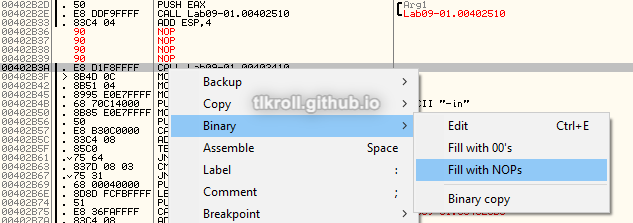
After replacing the instructions, they need to be copied to the executable:
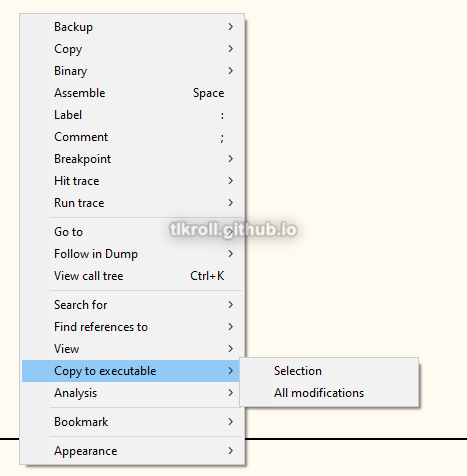
Then in the File window, the patched file needs to be saved (I chose to save to a separate Lab09-01-patched.exe to keep the original intact):
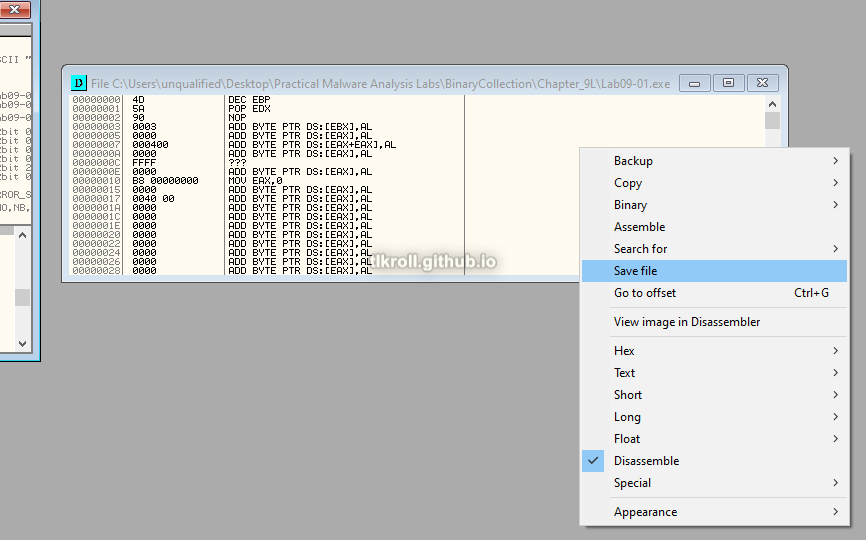
Many of the functions in this sample validate operations using argc, so some argument will need to be passed as a password, but in this patched version it doesn't matter what it is.
What are the host-based indicators of this malware?
Following the -in command (with the optional name argument), the malware is first copied into C:\Windows\System32 and then a service is created using the optional name with " Manager Service" appended and the copied file:
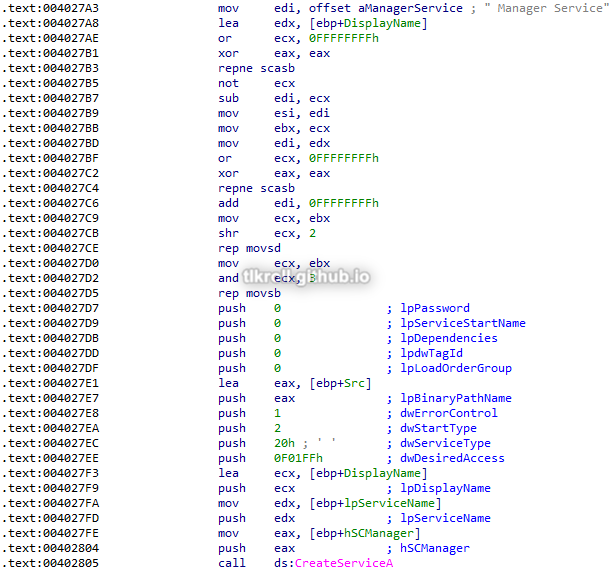
Later in this function some parameters, including a malicious URL, are pushed to the stack and the 0x401070 subroutine is called:

This function creates the key HKEY_LOCAL_MACHINE\SOFTWARE\Microsoft \XPS. Its value is difficult to follow statically and will be easier to check during dynamic analysis, but it is a safe assumption that the values pushed to the stack before this function was called are what is written to the key:
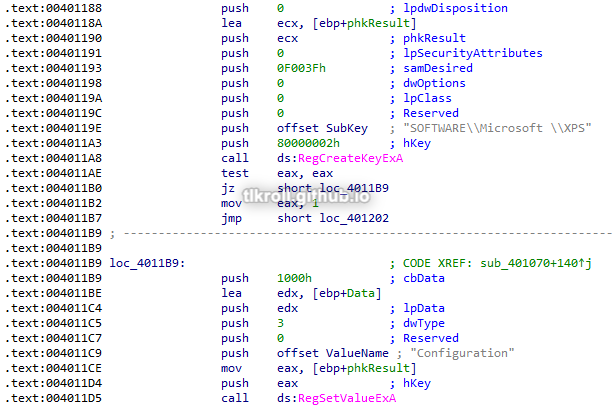
From this analysis, the best host-based indicator would be the look-alike Microsoft key with a space appended and its XPS sub-key. If the original filename is known, C:\Windows\System32 can be checked for its presence as well as any services pointing to it. The service's display name can vary depending on the argument chosen or the filename, but will always include " Manager Service".
What are the different actions this malware can be instructed to take via the network?
Going back to the three jump cases at the beginning of the main function, there is one case I skipped in order to answer the other questions:
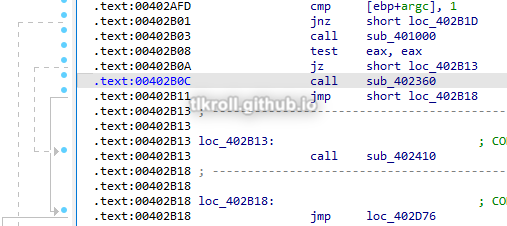
If no arguments are passed and the first jump is not taken, the subroutine at 0x401000 is called, which checks for the presence of the malicious registry entry discussed earlier. If that key is present, the call will be successful and the second jump will also not be taken. Before the third jump, a call is made to the function at 0x402360. Thinking about this for a minute is important because the key is present, meaning this malware has been installed already, and now it is executing a new function with no arguments.
The function at 0x402360 has two important subroutines at 0x401280 and 0x402020. The first reads values from the malicious registry key and these values are then used as arguments for the second. The 0x402020 subroutine then contacts the C2 server, parses the response, compares the values to five commands: SLEEP, UPLOAD, DOWNLOAD, CMD, and NOTHING. If 0x402020 returns 0, the loop begins again and otherwise exits. The four default values are ups, http://www.practicalmalwareanalysis.com, 80, and 60 (notice the second Microsoft key with the trailing space):
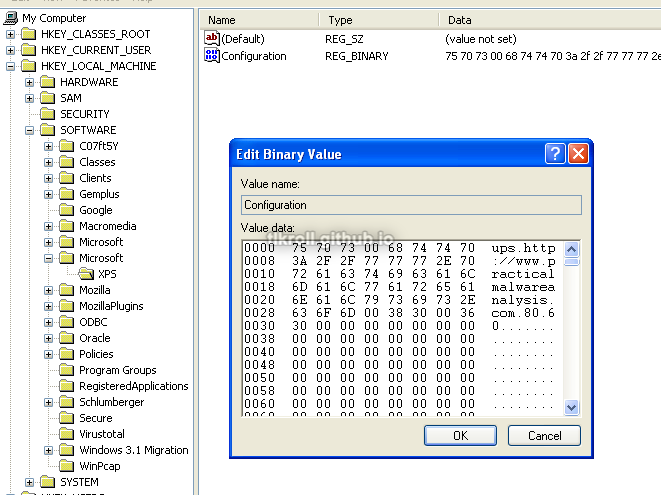
The ups parameter does not seem to have a function. The next two are the C2 URL and port, and the last parameter is the frequency that the C2 is contacted. After installation, a new C2 URL can be specified with the -c flag which will be contacted at the specified interval to retrieve one of the SLEEP, UPLOAD, DOWNLOAD, CMD, or NOTHING commands.
Just to see this in action, I set up a dummy C2 on an Ubuntu VM and directed the victim machine's outgoing traffic to it using ApateDNS. After installing the malware using the -in abcd arguments and then running the sample again with no arguments, the dummy C2 receives the following request:

Are there any useful network-based indicators for this malware?
The network indicator for this sample would be the http://www.practicalmalwareanalysis.com URL or whatever might take its place in the malicious registry key.
Malware Sample 2
This sample also must pass a check before it runs and performs some decoding to reveal the C2 URL.
Questions:
- What strings do you see statically in the binary?
- What happens when you run this binary?
- How can you get this sample to run its malicious payload?
- What is happening at 0x00401133?
- What arguments are being passed to the subroutine 0x00401089?
- What domain name does this malware use?
- What encoding routine is being used to obfuscate the domain name?
- What is the significance of the CreateProcessA call at 0x0040106e?
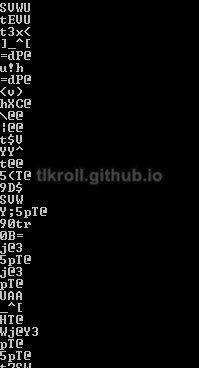
What strings do you see statically in the binary?
Other than imported function names and some error messages, there are no immediately recognizable strings:
What happens when you run this binary?
Nothing immediately obvious happens when running the binary; no processes are observed in Process Explorer and RegShot shows no interesting changes to the registry.
How can you get this sample to run its malicious payload?
Running the sample in OllyDbg shows a comparison that takes place and ends execution on failure:
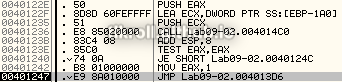
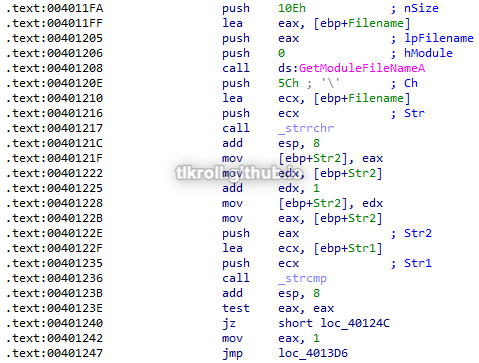
The two strings being compared are the current filename and ocl.exe:

To get this sample to run, it must be named ocl.exe.
What is happening at 0x00401133?
Opening the sample in IDA, the instructions starting at this address show a couple strings pushed to the stack one character at a time that weren't visible using the strings command. First 1qaz2wsx3edc is moved into the local variable IDA has named Str, then ocl.exe is moved into Str1:
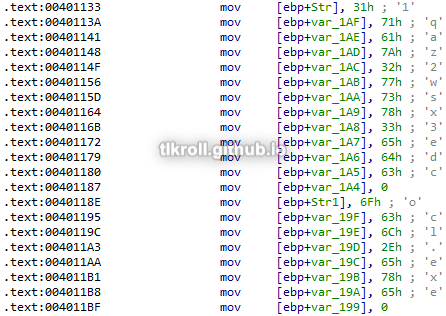
After these variables are initialized, GetModuleFileNameA is called and its return value is compared against Str1. If they are not equal, execution is terminated:
What arguments are being passed to the subroutine 0x00401089?
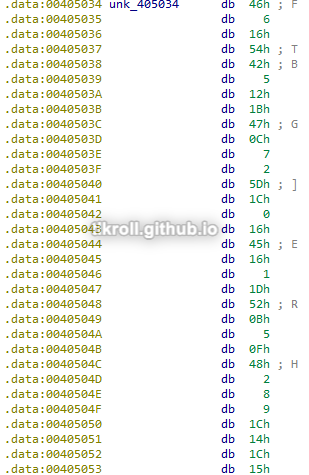
The two variables pushed to the stack before this call are the first string 1qaz2wsx3edc that was stored in the Str variable and an address to another string at 0x405034 containing more seemingly-random ASCII:

What domain name does this malware use?
The function at 0x401089 performs a series of operations on the obfuscated string it took as an argument. This is a good example of one of the advantages of dynamic analysis. Instead of spending a lot of time reverse-engineering the obfuscation routine, the function can be stepped over and the return value can be examined:
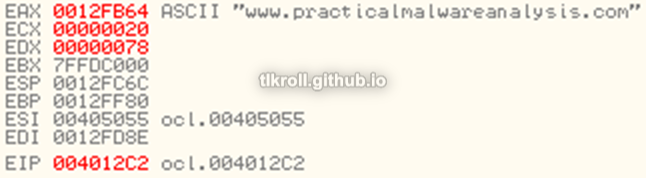
The domain returned from the de-obfuscation subroutine is www.practicalmalwareanalysis.com.
What encoding routine is being used to obfuscate the domain name?
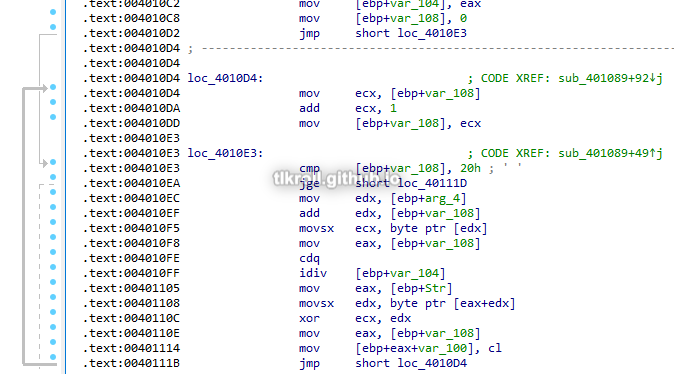
The two values pushed to the stack before the function at 0x401089 are XORed one character at a time to reveal the domain name. 1qaz2wsx3edc is the key and the string at 0x405034 was the XORed domain name:
What is the significance of the CreateProcessA call at 0x0040106e?
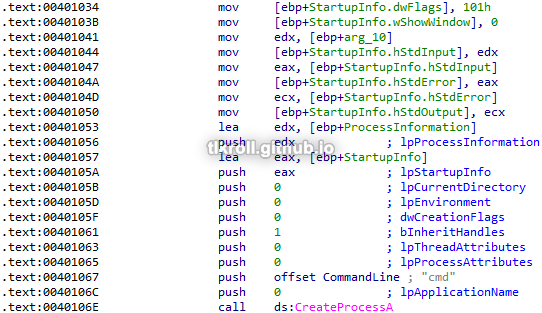
The call to CreateProcessA at 0x40106e is made inside of the subroutine 0x401000, which takes the socket handle for the C2 connection and uses it for StdInput, StdError, and StdOutput parameters in a new StartupInfo structure. CreateProcessA is then called using the "cmd" command and the StartupInfo structure with input/output/errors directed to the C2 server, creating a reverse shell:
Malware Sample 3
Questions:
- What DLLs are imported by Lab09-03.exe?
- What is the base address requested by DLL1.dll, DLL2.dll, and DLL3.dll?
- When you use OllyDbg to debug Lab09-03.exe, what is the assigned base address for DLL1.dll, DLL2.dll, and DLL3.dll?
- When Lab09-03.exe calls an import function from DLL1.dll, what does this import function do?
- When Lab09-03.exe calls WriteFile, what is the filename it writes to?
- When Lab09-03.exe creates a job using NetScheduleJobAdd, where does it get the data for the second parameter?
- While running or debugging the program, you will see that it prints out three pieces of mystery data. What are the following: DLL 1 mystery data, DLL 2 mystery data, and DLL 3 mystery data?
- How can you load DLL2.dll into IDA Pro so that it matches the load address used by OllyDbg?
What DLLs are imported by Lab09-03.exe?
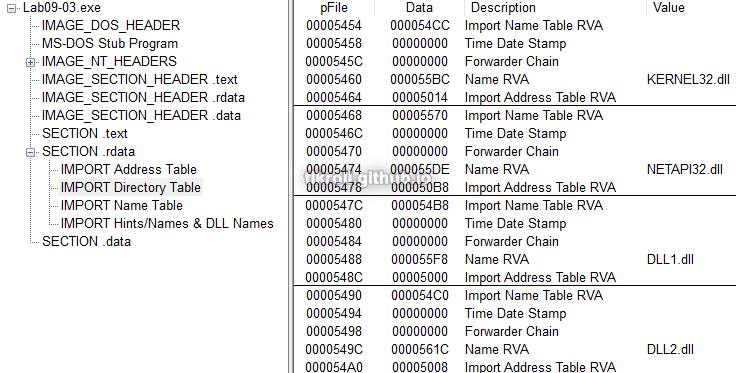
Looking at static imports in PEView, the only ones shown are KERNEL32.dll, NETAPI32.dll, DLL1.dll, and DLL2.dll:
However, looking at the disassembly shows DLL3.dll being loaded dynamically:

What is the base address requested by DLL1.dll, DLL2.dll, and DLL3.dll?
Looking at DLL1.dll in PEView again under the \IMAGE_NT_HEADERS\IMAGE_OPTIONAL_HEADER\Image Base value shows a preferred base address of 0x10000000:
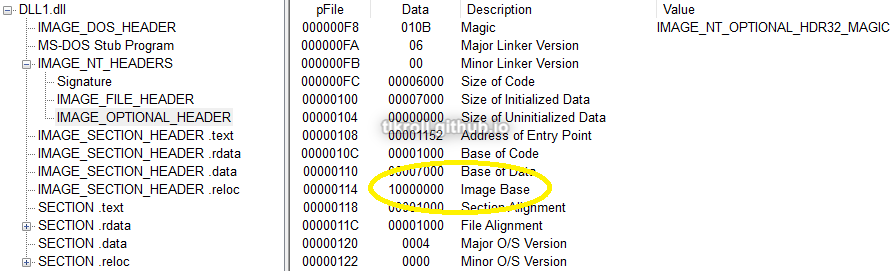
DLLs 2 and 3 list the same base preference, which means that only the first one loaded will use that address if it is available.
When you use OllyDbg to debug Lab09-03.exe, what is the assigned base address for DLL1.dll, DLL2.dll, and DLL3.dll?
This information can be seen in the Executable Modules window in OllyDbg:
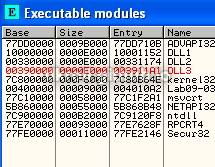
DLL1.dll was loaded at 0x10000000 as expected, but DLL2.dll and DLL3.dll were loaded at 0x330000 and 0x390000, respectively.
When Lab09-03.exe calls an import function from DLL1.dll, what does this import function do?
The function called from DLL1.dll is Dll1Print:
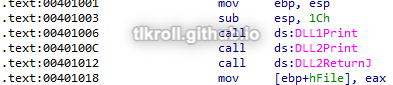
Dll1Print prints "mystery data" to the console:
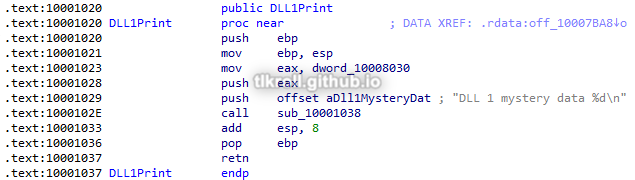
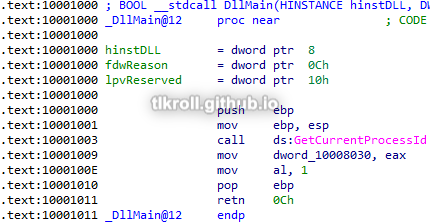
The data location referenced in the print call is written to in DllMain when the DLL is initially loaded with the return value of GetCurrentProcessId, meaning the DLL1 "mystery data" is the process ID:
When Lab09-03.exe calls WriteFile, what is the filename it writes to?
WriteFile writes to a handle returned by the DLL2ReturnJ function:
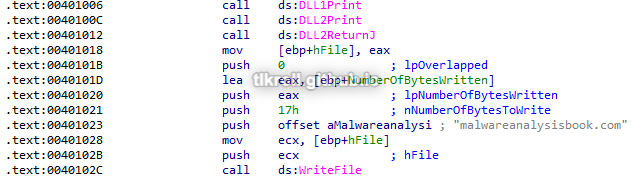
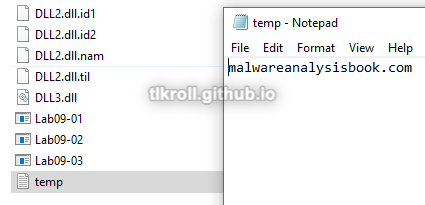
Similar to DLL1, DllMain creates a file named temp.txt and the handle is stored in memory. This is both the handle being written to with WriteFile and the value printed as the DLL2 "mystery data":
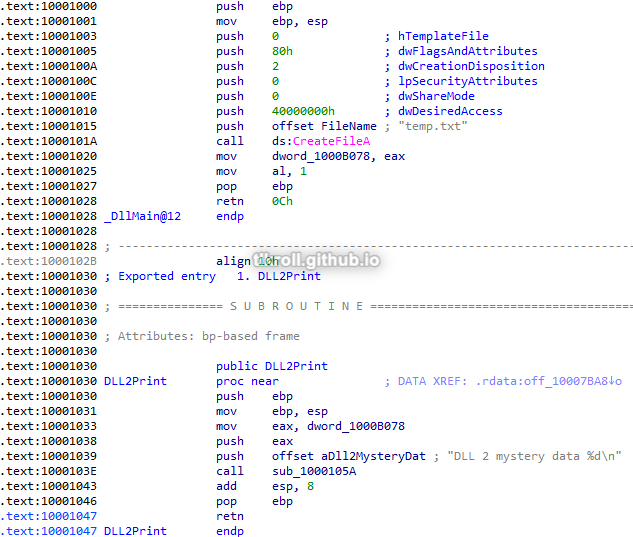
Running OllyDbg to the point after the file is created and looking in the folder where the sample is located, the string and filename observed during static analysis can be seen:
When Lab09-03.exe creates a job using NetScheduleJobAdd, where does it get the data for the second parameter?
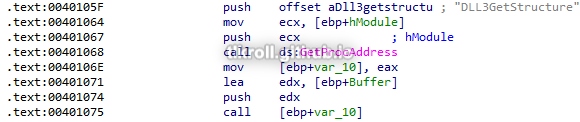
First, GetProcAddress is used to obtain the address of the DLL3GetStructure function from DLL3. Next, that function is called with a location IDA has named Buffer as an argument:
The DLL3GetStructure function moves data from a location in memory into the buffer which is passed to it as an argument. The data location is originally written to in DLL3's DllMain with a value of 0x36EE80:
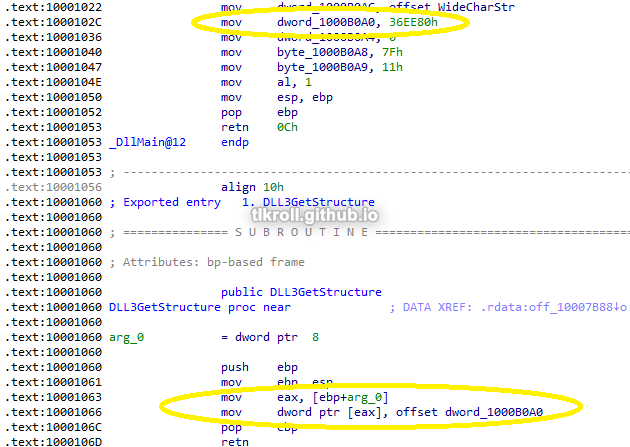
This means the second parameter for NetScheduleJobAdd is a static value from DLL3's DllMain.
While running or debugging the program, you will see that it prints out three pieces of mystery data. What are the following: DLL 1 mystery data, DLL 2 mystery data, and DLL 3 mystery data?
DLL1
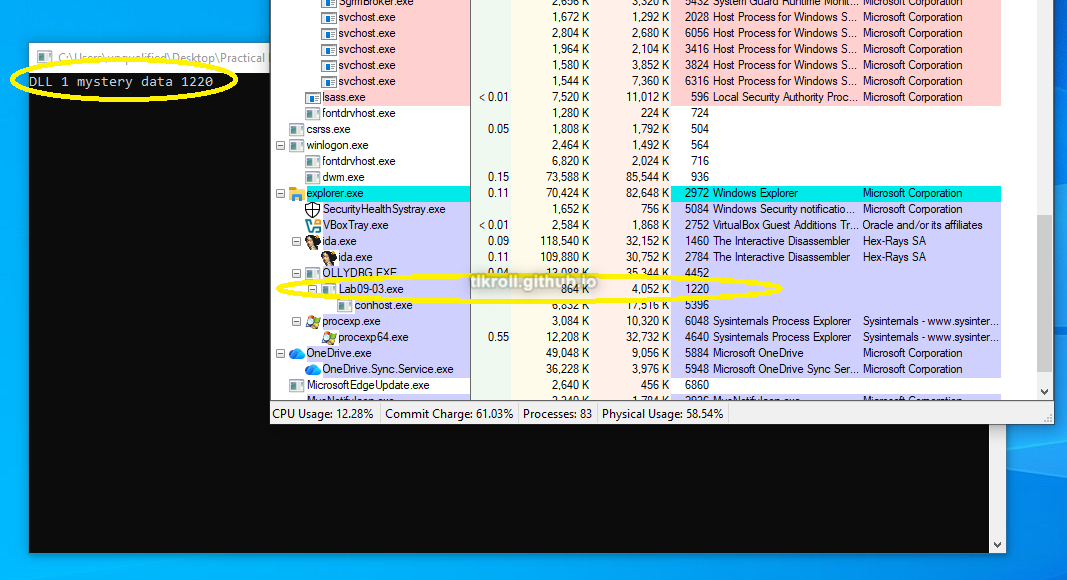
In Question 4 it was determined through static analysis that the DLL1 mystery data is the process ID. Here it is shown to be the case in dynamic analysis:
DLL2
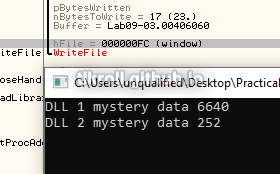
In Question 5 it was determined through static analysis that the DLL2 mystery data is the file handle being written to in the WriteFile call. Here, OllyDbg shows the file handle being written to is 0xFC and the console prints 252:
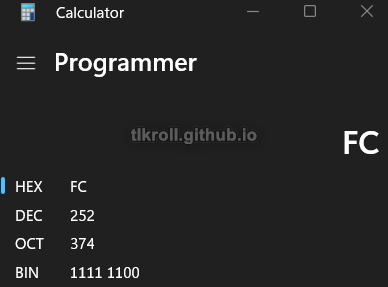
Converting types shows a match:
DLL3
DLL3's mystery data has not been looked at yet, but the variable passed to the print subroutine within Dll3Print is WideCharStr:
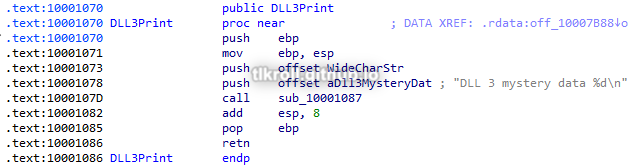
WideCharStr was defined in DLL3's DllMain:

This can be verified by stepping into Dll3Print with OllyDbg and looking at what arguments are passed, but the goal is to know what the actual data being printed to the console means. Converting to hex looks like a memory address:
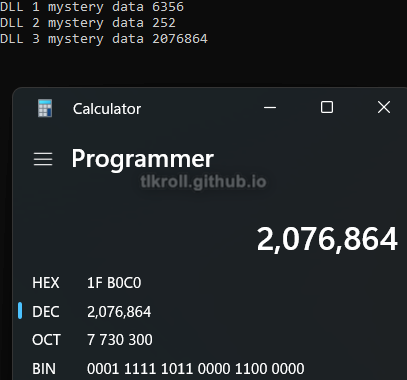
Looking at this address in OllyDbg's memory dump after the call to Dll3Print shows that this is indeed a pointer to the ping www.malwareanalysisbook.com string:

How can you load DLL2.dll into IDA Pro so that it matches the load address used by OllyDbg?
First, we need the loaded address from OllyDbg's Modules window:
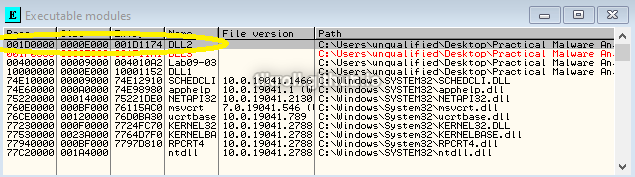
Then when opening the DLL in IDA, the Manual Load option must be checked:
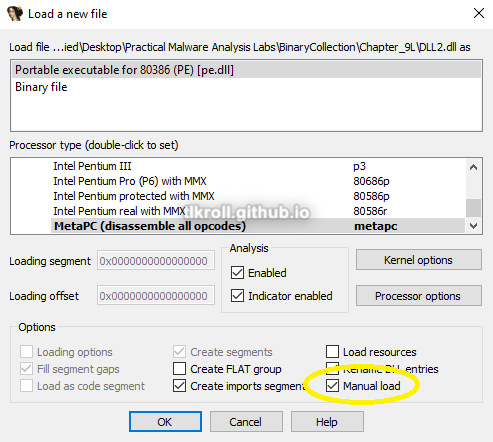
On the next screen, the base address from OllyDbg can be entered:
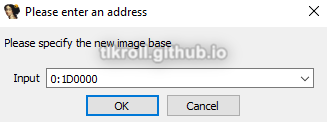
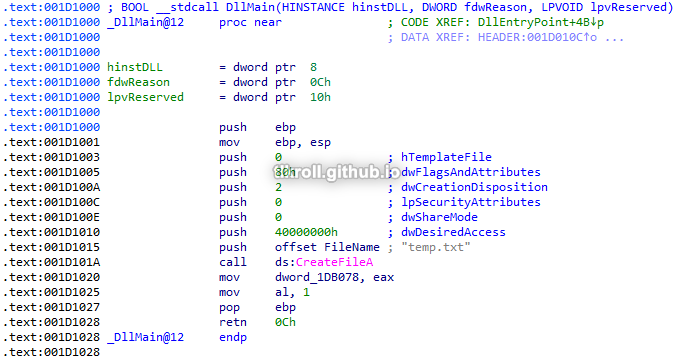
Now all of the addresses should line up so that no pointer math is necessary when switching between static and dynamic views:
Conclusion
This chapter gave me a lot of good practice with dynamic analysis using OllyDbg. Using dynamic analysis, I was able to avoid the tedious process of manually reverse engineering a deobfuscation routine and letting the program decode the C2 URL for me. This was a great way to learn my way around OllyDbg so that I can view dynamic data such as where DLLs have actually be loaded in memory and also allows me to verify findings from static analysis. I also learned how to patch binaries so that in certain cases like password protection, the password does not need to be known at all!